01DIN-rail automation controller · V1-EX2
An industrial controller
with expandable I/O,
HMI and a cloud link.
JasperMate is a no-code DIN-rail automation controller. You describe the logic and the controller builds it, then shows you the flow to approve before anything is applied. No training, no proprietary software, just a browser.
Got one already? Here’s the quick start guide.
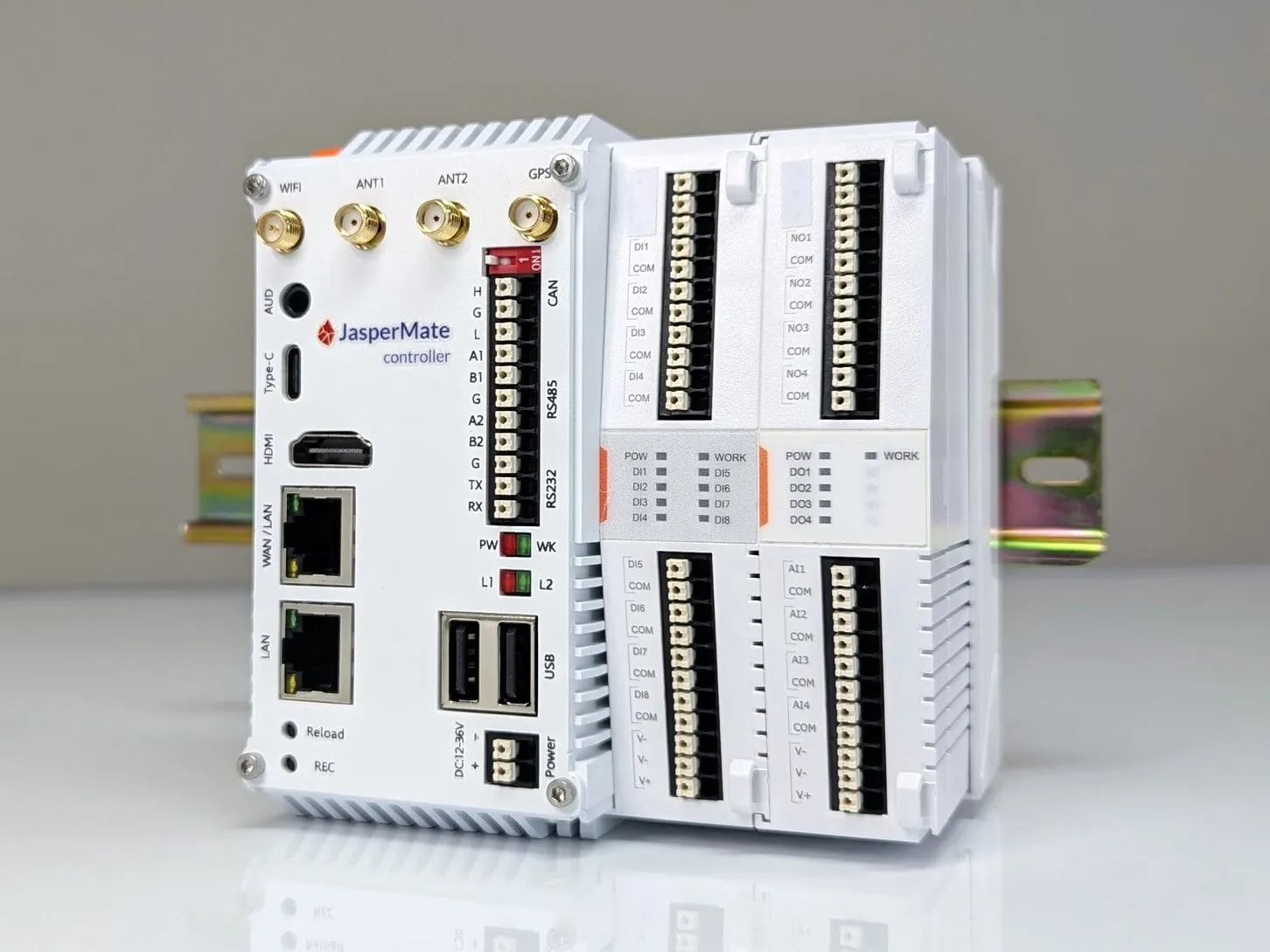
V1-EX2Base unit with onboard I/O
02Who it's for
Built for OEMs and system integrators
You build machines and panels that run on sites you rarely visit. Every PLC brand brings its own licence, its own cable and its own specialist, and every change means another trip to site.
JasperMate removes that overhead. Describe the sequence, check the flow, approve it. The controller mounts like any DIN-rail gear, and you program, monitor and support it from a browser, on site or remotely.
03How it works
Get it running in three steps
STEP 1
Wire it in.
12-36V DC supply and push-in terminals. Connect over Ethernet, Wi-Fi or 4G.
STEP 2
Open its jaspermate.link address.
Every unit has its own address. Any browser, no drivers, no software to install.
STEP 3
Describe the logic.
Type the sequence. The controller builds the tags and the flow, then waits for your approval.
What programming it looks like
Screenshots from the JasperMate web app
Pick an example
You type
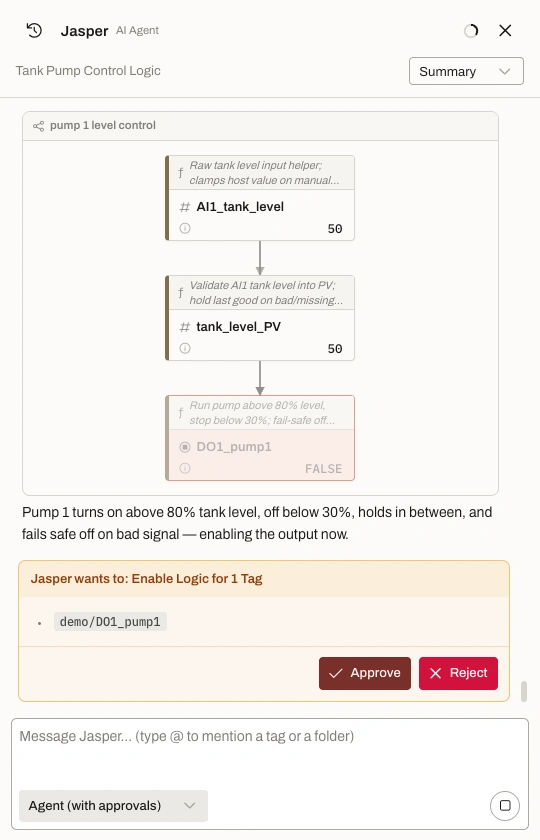
Run pump 1 when the tank level goes above 80 percent. Stop it below 30.
Jasper replies: Pump 1 turns on above 80% tank level, off below 30%, holds in between, and fails safe off on bad signal - enabling the output now.
- 01
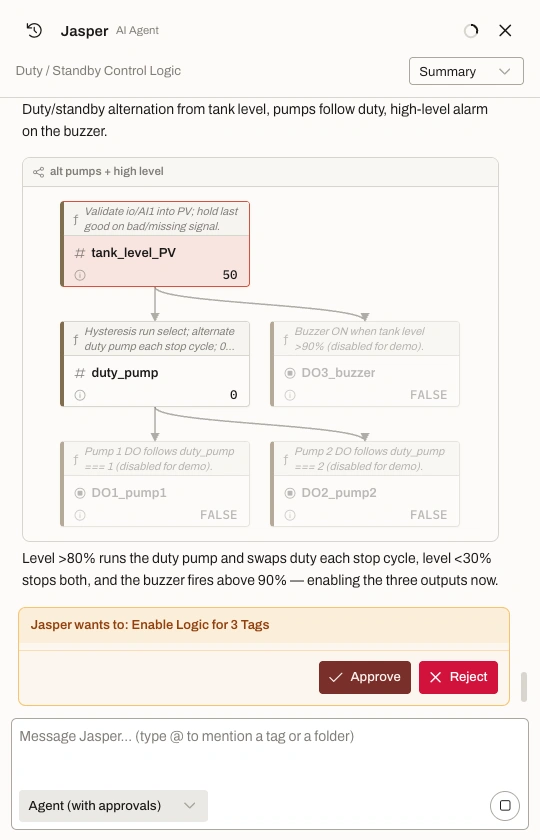
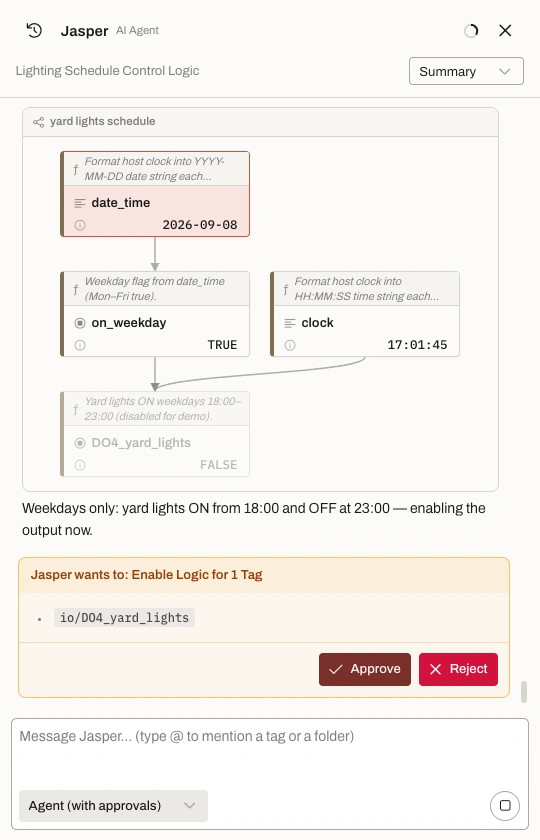
You type a sentence.
Plain English. No mnemonics, no function blocks, no vendor software.
- 02
It builds the tags and the logic.
Real tag names, live values, and a plain-English comment on every block.
- 03
Nothing goes live until you approve.
New outputs stay greyed out at FALSE. Approve puts them live; Reject discards them.
04Features
What every unit does out of the box
F01
Built-in HMI server.
The controller serves its own web HMI. Operators get a screen on a tablet, phone or PC, with no panel PC or HMI licence to buy.
F02
Remote access.
4G and Wi-Fi on board, with two nano-SIM slots. The access is IT friendly: no port forwarding, no static IP, no VPN router. Support your machines from the office instead of driving to site.
F03
The logic runs on the unit.
Logic executes on the controller, not in the cloud. If the internet drops, the plant keeps running. If the controller loses contact with its I/O, outputs drive to their configured safe states.
05Applications
The aux jobs that keep a site running
Pumps and fluid control
Tank level management, duty/standby pump sets, valve sequencing, lift stations.
Duty/standby pump set: 2 level sensors on analog inputs, 2 relay outputs to contactor coils, alternation and high-level alarm. One JasperMate, no expansion cards.
Building services
HVAC interlocks and staging, lighting schedules, access control logic.
Lighting and exhaust interlock: 4 digital inputs from switches and run signals, 3 relay outputs, weekday schedule on the onboard clock.
Process loops
Heating and cooling with hysteresis, simple mixing, dosing sequences.
Tank heating: 1x 4-20mA temperature transmitter, 1 relay to the heater contactor, setpoint with hysteresis and over-temperature lockout.
Auxiliary equipment
Conveyors, assembly stations, and retrofits where a rats-nest relay panel is due for retirement.
Conveyor interlock: run permissives on digital inputs, staged start across 3 relays, fault annunciation on the fourth.
06Specifications
Technical details
| Supply | 12-36V DC, 12 W |
| Digital inputs | 8x, 12-24V DC |
| Relay outputs | 4x dry contact, 3 A |
| Analog inputs | 4x 4-20mA, isolated |
| Expansion | Up to 10 I/O cards via side-bus |
| Ethernet | 2x RJ45, independent MACs. WAN 10/100/1000, LAN 10/100 |
| WiFi | Dual-band 802.11 b/g/n/ac/ax |
| Cellular | LTE Cat 4, 2x nano-SIM. Any SIM with a data plan, in either slot |
| Uplink order | Ethernet (WAN), then WiFi, then SIM 1, then SIM 2 |
| Serial | 2x RS485, 1x RS232, 1x CAN (hardware ready, not supported in early firmware) |
| Protocols | EtherCAT, Modbus TCP and RTU, serial, MQTT. InfluxDB datalogging. Built-in web HMI |
| GPS | Onboard receiver with position reporting |
| Primary method | Plain-English chat, with visual logic review before deploy |
| Alternative | JavaScript |
| Interface | Web browser, no install |
| Compute | Quad-core ARM Cortex-A55, 4 GB DDR4, 32 GB eMMC |
| Mounting | 35mm DIN rail |
| Dimensions (base unit) | 118H x 116W x 87D mm |
| Expansion card | 114H x 28W x 80D mm |
| Weight | 500 g |
| Enclosure | Flame-retardant ABS/PC, IP20 (cabinet installation required) |
| Operating temperature | -20°C to +70°C |
| Humidity | 5% to 95% non-condensing |
Full datasheet:download the PDF. No login, no form.
07In the field
Running in production, not in a lab
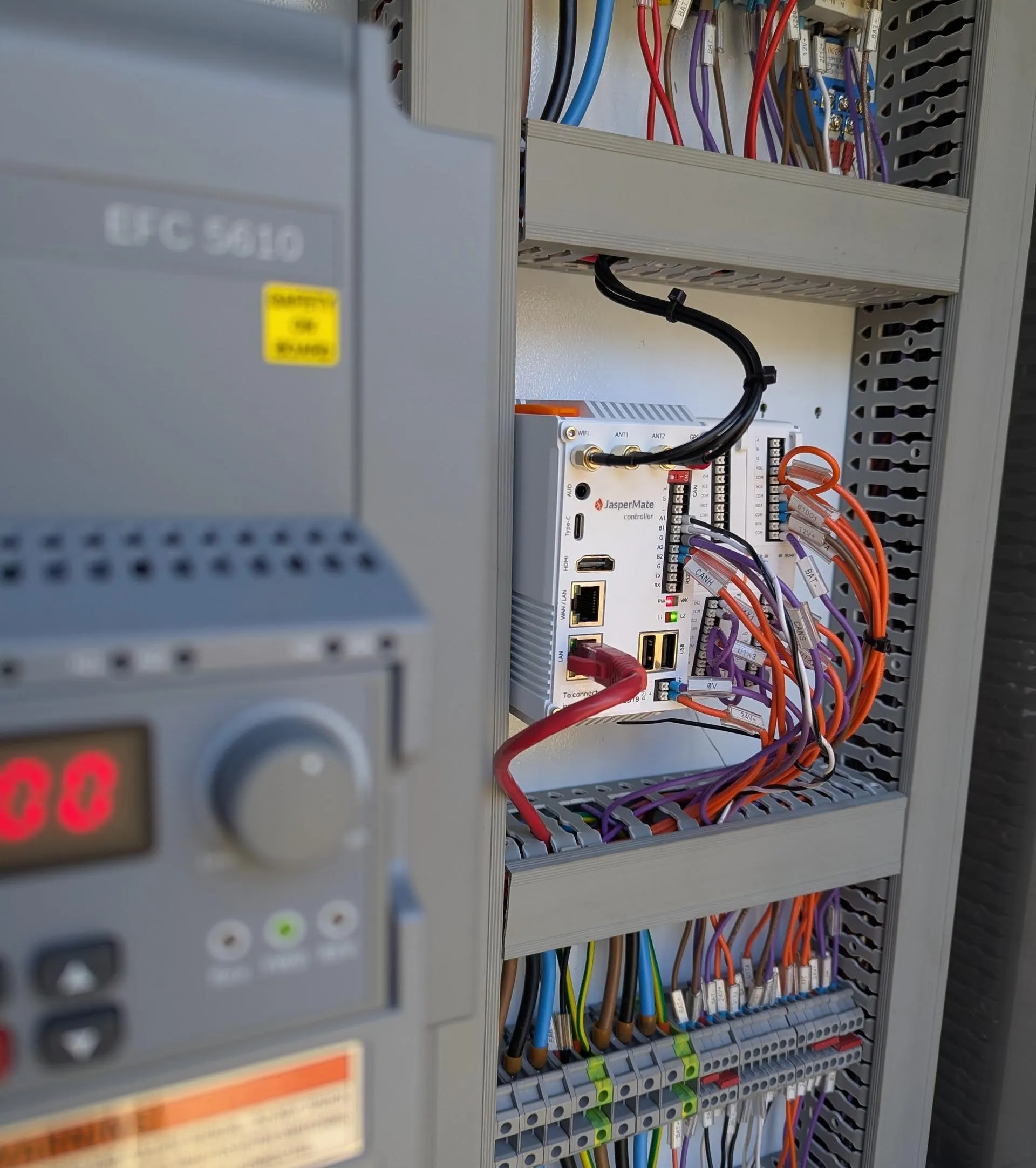
Water and wastewater
- Pump station control
- Automated pond level control
Manufacturing SME
- Supervisory control of set of furnaces
- Pump monitoring and controls
General industrial
- Control of MeBr fumigation system
- Vessel HVAC controls
Used on industrial and commercial sites around Australia, including a port authority and a local government.
08Order
Order a JasperMate
Pay by card online. For a purchase order or several units, email mate@jasperx.com.au and we quote within one business day.
In the box
- 01JasperMate controller, base unit with onboard I/O
- 02Wi-Fi antenna
- 032x 4G antennas
- 04GPS antenna
- 051m Ethernet cable
- 06Quick start guide
Expansion cards are sold separately. Up to 10 clip onto the side-bus, adding digital and analog I/O including 4-20mA and 0-10V outputs.
09FAQ
Common questions
How does first-time Wi-Fi setup work?
From a phone, with no app or laptop. A new unit opens its own temporary Wi-Fi network, and joining it brings up the setup page: pick your Wi-Fi and type the password. The password is encrypted in your browser before it leaves the phone, and while the setup network is open the unit exposes only that page. Your own network stays unreachable. Missed the window? Hold Reload for 3 seconds to open a new one.
What happens when the internet drops out?
The logic keeps running, because it executes on the controller, not in the cloud. Remote access and plain-English programming pause until the connection returns. The machine doesn't notice.
Does it do Modbus or talk to other PLCs?
Yes. Modbus TCP and RTU, EtherCAT, plain serial and MQTT are all supported, over the onboard ports (2x RS485, 1x RS232) or Ethernet, so remote I/O, drives, meters and other controllers connect directly. Values can be logged to InfluxDB, and the same interface doubles as a web HMI. Have a specific protocol or device in mind? Email support@jasperx.com.au with the spec and we will confirm it against the current firmware before you buy.
Do I need to know how to code?
No. Plain English and the flow diagram cover the intended use. If you do write code, everything is programmable in JavaScript, and you can read and edit every line the controller generates.
Where is it made, and who's behind it?
JasperMate is developed by ControlX Engineering Pty Ltd, an Australian controls engineering company. Support is by email to support@jasperx.com.au and goes straight to the engineers who built it, not a call centre.